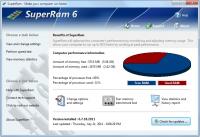
SuperRam makes your computer run faster by taking control and managing the memory on your computer efficiently. SuperRam gives you full control over how memory works on your computer and allows you to fine tune how your computer operates.
SuperRam makes your computer run faster by taking control and managing the memory on your computer efficiently. If you notice your computer is running slow, this typically is due to the memory (RAM) running out of usable space. When memory space gets lower, Windows then starts opening programs into the Windows page file; this page file is the computer hard drive which is much slower than RAM. SuperRam switches this behavior and puts old programs into the Windows page file and any newly opened programs are put into actual RAM. This change in how Windows operates allows programs and games to run faster. SuperRam constantly runs in the background on your computer and determines when the memory on your computer is getting to a low threshold; once it reaches this threshold it immediately frees memory back to the computer and makes programs run faster since they have access to physical memory. SuperRam's settings allow you to freely adjust and change this low memory threshold and give you the ability to determine how much memory to free back to Windows. SuperRam gives you full control over how memory works on your computer and allows you to fine tune how your computer operates. SuperRam intelligently manages memory unlike many other memory management programs available on the internet. SuperRam monitors how much of your computer processor is being utilized; ensuring that it does not free memory when the computer is processing large amounts of data and cause slowdowns. SuperRam can also detect when a program is running full screen, such as a game or a DVD and prevent memory from being freed to also prevent the screen from lagging and causing video problems to occur. If you are using a laptop SuperRam can also be told not to run when the laptop is on battery power and only work when plugged in. These settings allow you to fully control SuperRam and dictate how your computer works.
Requirements:
• 5 Mb hard disk space
• VGA or higher resolution monitor
• Mouse or other pointing device
• Microsoft Internet Explorer 4 or higher
• Intel Pentium 90 MHz or higher (P 166 MHz recommended)
Operating system:Windows XP / XP 64 bit / Vista / Vista 64 bit / 7 / 7 64 bit / 8 / 8 64 bit / 2003 / 2008 / 10 / 10 64 bit
Release notes:New Release

Step on the gas...and stay in control. 7Smoker Pro allows you to change various settings in the Windows Registry. These settings can improve the performance of your computer.
Price: $9.99, Rating: 6, Downloads: 253
Download

Make your PC run like new! Protect your data from malware and intruders. System Mechanic Pro combines 6 powerful products to optimize your registry, defragment drives and memory, speed up your computer, scrub personal data, and remove spyware.
Price: $27.98, Rating: 6.97, Downloads: 229
Download

Create baselines of your pc.
Price: $0, Rating: 8, Downloads: 164
Download
iSysCleaner is a freeware system optimization tool. It removes all unused files from your system with few clicks and faster - freeing up valuable hard disk space.
Price: $0, Rating: 10, Downloads: 163
Download
Stellar Smart - A Hard Drive / Disk monitoring software to diagnosis and monitor the activity of Hard drive as Temperature, Head Flying Height, Spin-Up Time.Stellar Smart acts as an "early warning system" for pending hard disk problems.
Price: $49, Rating: 8, Downloads: 144
Download 
 SuperRam 7.5.29.2017